
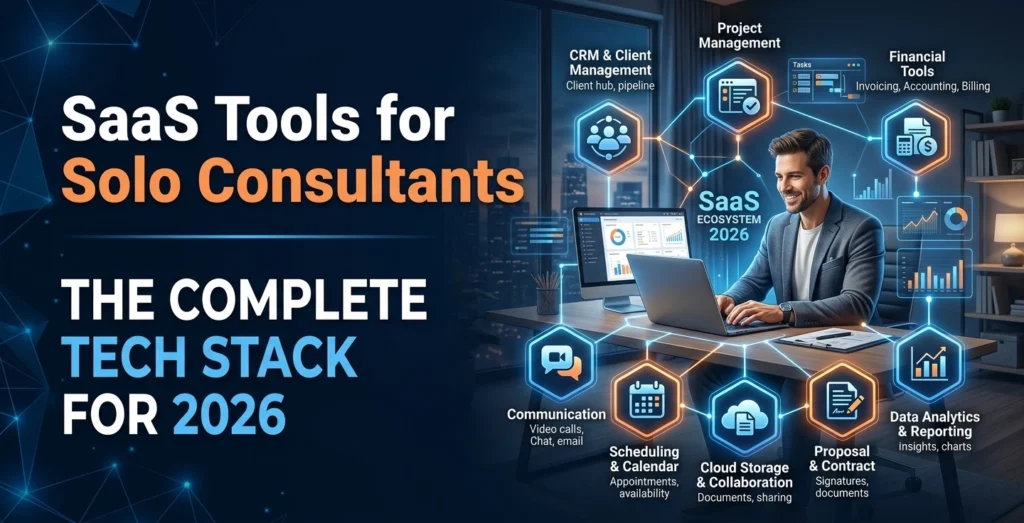
The best SaaS tools for solo consultants help you manage the entire client journey without building a complicated software stack. A practical setup covers lead management, meetings, proposals, contracts, onboarding, project delivery, payments, and follow-ups while keeping repetitive work automated.
The goal is not to collect dozens of apps. It is to build a simple consultant tech stack where each tool has a clear job and connects smoothly with the others.
- What Are SaaS Tools for Solo Consultants?
- Essential SaaS Tools Every Solo Consultant Needs
- Quick Comparison of SaaS Tools for Solo Consultants
- SaaS Tools for Sales, Proposals, and Client Onboarding
- AI Tools and Automation for Solo Consultants
- Invoicing, Payments, Accounting, and SaaS Integrations
- Best SaaS Stack by Consultant Type and Budget
- How to Choose and Build Your Solo Consultant SaaS Stack
- Frequently Asked Questions About SaaS Tools for Solo Consultants
What Are SaaS Tools for Solo Consultants?
SaaS, or Software as a Service, refers to software you access online, usually through a subscription or free plan. For consultants, SaaS removes much of the technical work involved in installing, maintaining, and updating business software.
A strong solo consulting workflow can look like this:
Lead → Discovery Call → Proposal → Contract → Onboarding → Project Delivery → Invoice → Payment → Follow-Up
Instead of managing every step manually, SaaS tools can keep information moving between stages. For example, a lead can book a call, enter your CRM, receive a proposal, sign an agreement, and trigger an onboarding process.
A focused stack also prevents SaaS tool sprawl. Six connected tools that solve specific problems are often easier to manage than 15 unrelated apps that require constant copying and pasting.
Essential SaaS Tools Every Solo Consultant Needs
The core solo consulting business software you need depends on how you sell and deliver services, but most consultants need five basic functions: CRM, project management, scheduling, time tracking, and client management.
A simple starting stack can include:
- A CRM for leads and follow-ups
- A project management platform for active client work
- Scheduling, invoicing, or client-management software
- An AI tool for research and content tasks
- An automation tool to connect important workflows
For example, HubSpot currently offers a free CRM with contact management, deal pipelines, meeting scheduling, email tools, and reporting, making it possible to start without a paid CRM subscription.
An all-in-one platform can also make sense. HoneyBook, for example, combines client management, proposals, contracts, invoices, payments, scheduling, automations, and client portals in its plans.
CRM for Consultants
A CRM for consultants should make it easy to see who a prospect is, where the deal stands, and what action comes next.
Useful CRM fields include:
- Contact and company information
- Lead source and service interest
- Deal value and pipeline stage
- Last contact, next task, and follow-up date
Keep the pipeline simple. A solo consultant might only need stages such as New Lead → Call Booked → Proposal Sent → Negotiation → Won/Lost.
The CRM should act as your sales memory. When a prospect returns after three weeks, you should be able to understand the previous conversation without searching through old emails.
Project Management and Time Tracking Tools

Once a client signs, project management tools become the operational center of the engagement. They help you manage deliverables, deadlines, tasks, files, approvals, and client responsibilities.
ClickUp is one example with a free plan and paid plans that add capabilities such as native time tracking, integrations, dashboards, and automation.
Time tracking software becomes especially useful when you bill hourly or want to understand project profitability. Compare the hours spent on a project with the amount collected to identify work that is taking longer than expected.
Quick Comparison of SaaS Tools for Solo Consultants
| Tool | Main Use | Best For | Key Strength |
| HubSpot CRM | CRM & lead management | Managing prospects and sales pipelines | Contacts, deals, follow-ups, and pipeline tracking |
| ClickUp | Project management & time tracking | Managing client projects and tasks | Tasks, deadlines, documentation, and time tracking |
| Calendly | Appointment scheduling | Discovery calls and client meetings | Booking links, calendar sync, reminders, and scheduling automation |
| HoneyBook | Client management | Consultants wanting multiple functions in one platform | Proposals, contracts, invoices, payments, scheduling, and client portals |
| Notion | Knowledge management | Organizing research, notes, templates, and SOPs | Flexible workspace for a consultant’s knowledge base |
| Zapier | Workflow automation | Connecting everyday business apps | Simple no-code automations between SaaS tools |
| Make | Advanced workflow automation | Multi-step and visual workflows | More detailed workflow building and data handling |
| n8n | Advanced automation | Technical users and complex workflows | Flexible automation with greater technical control |
SaaS Tools for Sales, Proposals, and Client Onboarding
Your sales process should not depend on manually sending every reminder or building every document from scratch.
Appointment scheduling tools can handle booking pages, calendar connections, reminders, and qualification questions. Calendly currently offers a free plan with one event type and one calendar connection, while paid plans add multiple calendars, reminders, automations, payments, and integrations.
A simple automated sequence can be:
Booking form → CRM contact → Discovery call → Proposal → Contract → Invoice → Welcome email → Project workspace
That sequence reduces administrative work while keeping the client experience consistent.
Client onboarding software can also standardize intake forms, contracts, deposits, welcome messages, project folders, and kickoff meetings. This matters because onboarding is often where small consulting businesses lose time through repeated manual steps.
Proposal and Contract Software
Proposal and contract software helps you create professional documents, collect approvals, and handle e-signatures without relying on email attachments.
A strong setup should let you reuse:
- Service descriptions and pricing
- Terms and conditions
- Scope-of-work sections
- Signature and approval steps
Platforms such as HoneyBook combine proposals, contracts, invoices, payments, and client management, which can reduce the number of separate tools you need.
A practical tip: create templates for your most common service packages. You can then customize the scope for each client instead of rebuilding the document every time.
Client Portals
Client portal software gives clients a dedicated place to access documents, project information, messages, invoices, and deliverables.
A portal becomes more useful than email when a project has multiple files, approvals, recurring updates, or several deliverables. It also reduces the chance of important information becoming buried in long email threads.
For small projects, email and cloud storage may be enough. For repeat engagements, a portal can provide a more organized client experience.
AI Tools and Automation for Solo Consultants
Modern AI tools for consultants can support research, analysis, writing, meetings, presentations, reports, and communication. The key is to use AI for repeatable work while keeping strategic decisions and client relationships under human control.
Useful AI tasks include:
- Summarizing long documents and research
- Creating first drafts of reports and presentations
- Turning meeting notes into tasks and follow-up messages
- Comparing research sources and organizing information
The highest-value setup is often an AI-plus-automation workflow rather than a standalone chatbot.
For example:
Meeting recording → Transcript → AI summary → Action items → CRM update → Follow-up email
This turns one meeting into structured business information without requiring you to update every system manually.
AI Research and Knowledge Management

AI can reduce research time, but its output becomes more useful when it works with your own organized knowledge.
Build a knowledge management / second brain containing your:
- Client research and notes
- Consulting frameworks and checklists
- Proposal and report templates
- Lessons from previous projects
- Frequently used prompts and processes
Tools such as Notion can be used as an individual knowledge and project workspace, with a free plan available for personal use.
The practical advantage is reuse. Instead of asking AI to start from zero for every client, you can provide your approved frameworks, examples, and internal references as context.
Zapier vs Make vs n8n
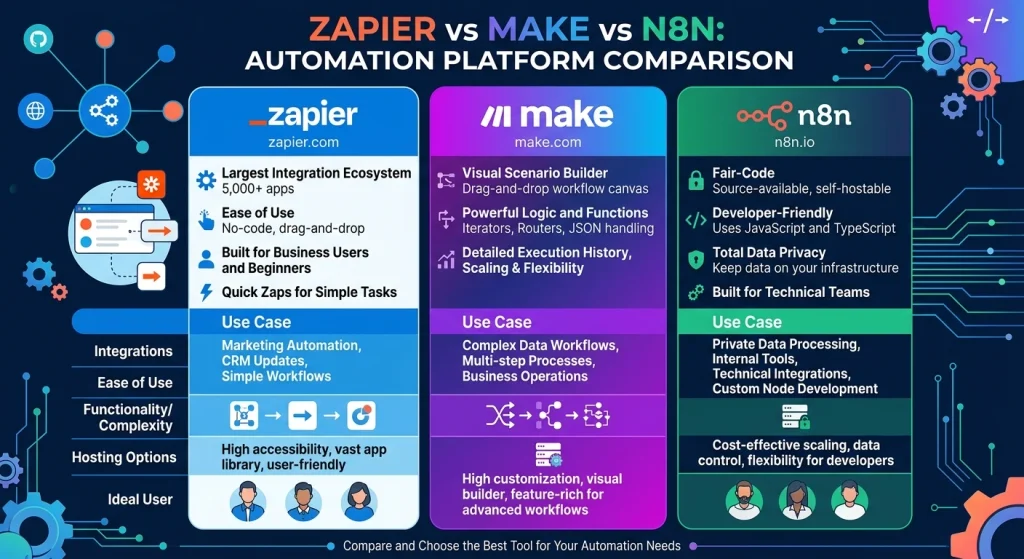
Automation platforms connect your SaaS tools so information can move without manual work.
Zapier is a strong choice when you want straightforward no-code automation. Its current free plan includes 100 tasks per month, while paid plans support multi-step workflows and premium apps.
Make uses a visual scenario builder and currently offers a free plan with 1,000 credits per month. Paid tiers provide higher usage and more control over execution.
n8n is more suited to users who want greater technical control and complex workflows. Its cloud plans are based around workflow executions, while self-hosting gives you control over where the system runs and where data is stored.
Use simple automation for tasks such as notifications, record creation, and reminders. Move to more advanced business process automation when several conditions, data transformations, APIs, or approval steps are involved.
Invoicing, Payments, Accounting, and SaaS Integrations
Your finance stack needs to handle invoices, payment collection, expenses, financial records, and reporting.
Invoicing and accounting software should connect with your payment process without turning your CRM into an accounting system. Keep sales information in the CRM and financial records in the accounting platform, while allowing the systems to exchange relevant data.
QuickBooks Online, for example, provides income and expense tracking, invoice management, payment reminders, and bank transaction imports.
For payment collection, Stripe supports online payments and charges transaction fees rather than requiring a standard monthly platform fee on its basic pricing model. Its U.S. standard rate currently lists 2.9% + 30¢ for successful domestic card transactions.
Important SaaS integrations can include:
CRM ↔ Email ↔ Calendar ↔ Project Management ↔ Accounting ↔ Payments ↔ Client Portal
Before choosing a tool, check whether it connects to the software you already use. A cheaper tool that cannot integrate with your CRM or accounting system may cost more in manual work.
Best SaaS Stack by Consultant Type and Budget
Different consultants need different combinations of tools. A marketing consultant may prioritize content and reporting, while an IT consultant may need technical documentation, ticketing, or advanced automation.
| Consultant Type | Useful Stack |
| Marketing consultant | CRM + scheduling + project management + AI + reporting |
| Business consultant | CRM + proposals + meeting AI + knowledge management + client portal |
| IT consultant | CRM + project management + documentation + automation + invoicing |
| Financial consultant | CRM + scheduling + secure documents + accounting + client portal |
| Coach/advisor | Scheduling + CRM + payments + client portal + meeting notes |
| Freelance specialist | CRM + proposals + project management + time tracking + invoicing |
0–25 Starter Stack
A beginner can keep recurring software costs very low by combining free plans.
For example, HubSpot CRM, ClickUp Free, Calendly Free, Notion Free, and transaction-based payment tools can cover many core needs without multiple monthly subscriptions.
Lean Professional Stack
A growing consultant can add paid scheduling, better project management, invoicing, and automation. Current examples include Calendly Standard at $10 per seat per month billed annually, ClickUp Unlimited at $7 per user per month billed annually, and Make Core at $12 per month for 10,000 credits.
Highly Automated Stack
A more advanced stack may combine a CRM, client management platform, project system, accounting, AI, and automation tools. Costs can move well beyond $100 per month depending on usage, premium AI, payment volume, and automation requirements.
Do not buy the advanced stack simply because it has more features. Upgrade when a specific bottleneck is costing you time or causing missed work.
How to Choose and Build Your Solo Consultant SaaS Stack
Start with your workflow, not the software brand.
Consider:
- Number of active clients and leads
- Monthly software budget
- Hourly, project, retainer, or value-based billing
- Technical skill level
- Number of active projects
- Need for automation and integrations
Build the stack in this order:
1. CRM → 2. Scheduling → 3. Project management → 4. Payments/accounting → 5. AI → 6. Automation
This sequence lets you establish your core operations before adding advanced features.
Do not automate tasks that require personal judgment, sensitive negotiations, or nuanced client communication. Automation should remove repetitive administration, not remove the consultant from important decisions.
Data Privacy and Client Confidentiality
Consultants often handle contracts, financial details, internal business data, strategy documents, and meeting recordings. Before connecting these materials to SaaS or AI platforms, review permissions, data handling, storage, integrations, and account security.
Use separate client workspaces and access controls where appropriate. Also avoid giving an automation more permissions than it actually needs.
One Platform vs Multiple Specialized Tools
An all-in-one platform is easier to manage because fewer systems need to communicate. HoneyBook, for example, combines client management, proposals, contracts, invoices, payments, scheduling, and client portals.
Specialized tools can provide deeper functionality. For example, a consultant may prefer a dedicated CRM, advanced project platform, accounting system, and automation service because each solves a different problem.
The right choice depends on complexity. A new solo consultant can often start with four to six tools, then replace, consolidate, or upgrade them as the business grows.
Frequently Asked Questions About SaaS Tools for Solo Consultants
What is the best CRM for solopreneurs?
The best CRM for a solopreneur is one that makes lead tracking, follow-ups, pipeline management, and client communication simple. Look for an easy interface, useful integrations, automation, and a free or affordable plan that fits your business size.
What is replacing SaaS?
SaaS is not being replaced by one single technology. Instead, traditional SaaS is evolving through AI-powered software, AI agents, vertical SaaS, and more automated tools that can complete tasks instead of only providing a place to manage them.
What are the best software tools for consultants?
The most useful software categories for consultants include CRM, project management, appointment scheduling, proposal and contract software, invoicing, client portals, AI tools, and workflow automation. The right combination depends on your services, clients, budget, and workflow.
What are some examples of SaaS-based tools?
Examples of SaaS tools include HubSpot for CRM, ClickUp for project management, Calendly for scheduling, Notion for knowledge management, and Zapier for automation. These tools are accessed online rather than installed and maintained entirely on your own computer.
Is ChatGPT considered SaaS?
Yes. ChatGPT is delivered as an online software service that users access through the web and supported apps. This makes it an example of software delivered through the SaaS model.
Can you give me an example of a SaaS tool?
HubSpot is a simple example of a SaaS tool. A consultant can use it online to store contacts, manage leads, track deals, schedule meetings, and organize the sales pipeline without running the software on their own server.