Businesses often spend hours on repetitive work such as entering data, updating spreadsheets, processing invoices, and moving information between systems. Droven.io RPA and business automation is a topic that helps beginners understand how robotic process automation, workflow automation, and AI can make these processes more efficient.
One important point comes first: Droven.io is presented as an informational platform covering RPA, AI, automation, and digital transformation rather than as an RPA software product that businesses directly install to create bots.
- What Is Droven.io RPA and Business Automation?
- What Is Robotic Process Automation?
- RPA vs Business Automation vs AI Automation
- How Businesses Can Use RPA and Automation
- Benefits and Limitations of Business Automation
- How to Choose the Right Automation Approach
- How to Get Value From Droven.io
- Final Thoughts on Droven.io RPA and Business Automation
- Q&A
What Is Droven.io RPA and Business Automation?
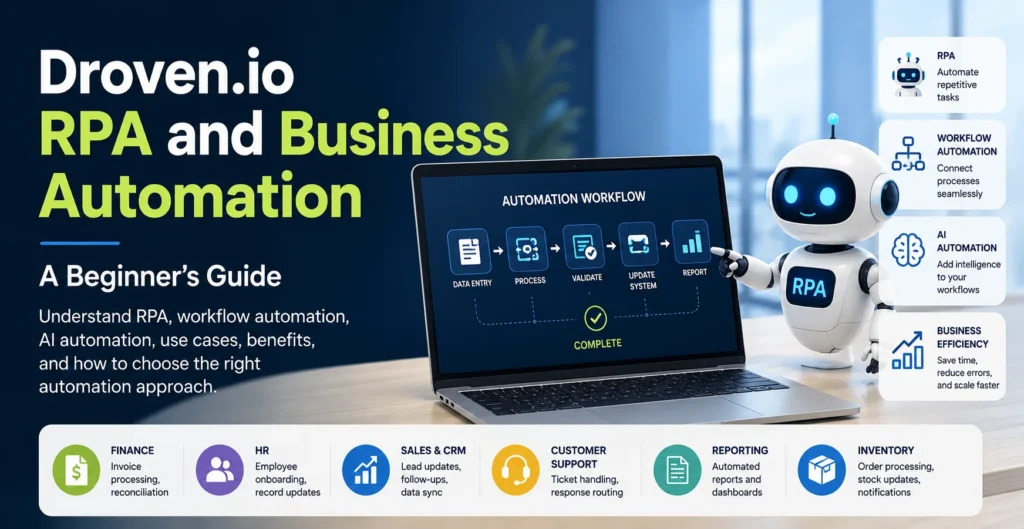
Droven.io RPA and business automation brings together several related ideas, including robotic process automation, business process automation, workflow optimization, and AI automation. The goal is to help people understand how businesses can use technology to reduce repetitive manual work and improve everyday operations.
RPA is one part of the larger automation picture. Business automation can connect different applications and processes, while AI automation can add capabilities such as understanding documents, analyzing information, or working with natural language.
For someone new to automation, the main idea is simple: instead of asking employees to repeat the same digital steps hundreds of times, businesses can use software bots and automated workflows for suitable tasks.
What Is Robotic Process Automation?
Robotic Process Automation, or RPA, uses software bots to perform repetitive, rule-based computer tasks. These bots can interact with applications in ways that copy defined actions normally performed by a person. IBM describes RPA as a way to automate repetitive office tasks such as extracting data, filling forms, and moving files.
Common RPA examples include:
- Data entry between different business systems
- Invoice processing
- Spreadsheet updates
- Email handling
- Report generation
- Moving information between applications
Imagine an employee receives an invoice by email. They download it, copy the invoice number and amount, enter the information into accounting software, update a spreadsheet, and send a confirmation. If the process follows clear rules, RPA can handle many of these repetitive steps.
RPA works best when a process is structured, predictable, and repeated often. It can improve productivity because employees can spend less time on manual work and more time on tasks requiring human judgment.
RPA vs Business Automation vs AI Automation
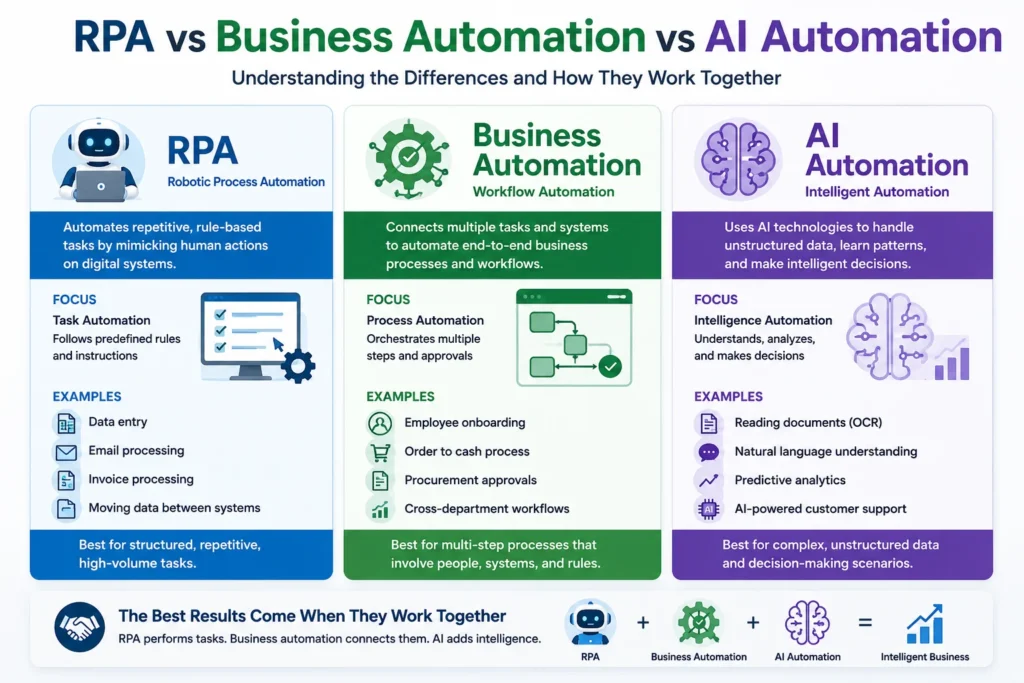
These terms are related, but they do not mean the same thing.
RPA focuses mainly on specific repetitive tasks. A software bot might copy information, open applications, update records, or generate a report according to predefined rules.
Business automation is broader. It can connect several tasks, applications, approvals, and notifications into a complete business workflow. It may use APIs, workflow platforms, RPA, or other automation tools.
AI automation adds artificial intelligence to the process. AI can help interpret documents, understand natural language, identify patterns, or work with information that is less structured.
IBM explains that RPA is process-driven, while AI is more data-driven, but the two technologies can also work together. AI can help RPA handle more complex information, while RPA can carry out actions based on AI-generated results.
How Businesses Can Use RPA and Automation
RPA and business workflow automation can support many departments.
In finance, invoice processing automation can capture information from invoices, update accounting records, and start approval workflows.
In HR, automation can help with employee onboarding by creating records, sending documents, and notifying the right teams.
In sales, CRM automation can move customer records into the correct system, assign leads, and create follow-up tasks.
In customer support, automated workflows can collect basic information and route requests to the appropriate employee.
In reporting, automated reporting can gather information from different business systems and prepare regular reports.
In inventory, automation can update stock records, monitor order information, and notify employees when certain conditions are met.
For example, imagine a retailer receiving hundreds of orders every day. Instead of manually copying order information into several systems, an automated workflow could transfer the data, update inventory, create the required records, and notify the shipping team. Employees can then focus on unusual orders and customer problems.
Benefits and Limitations of Business Automation
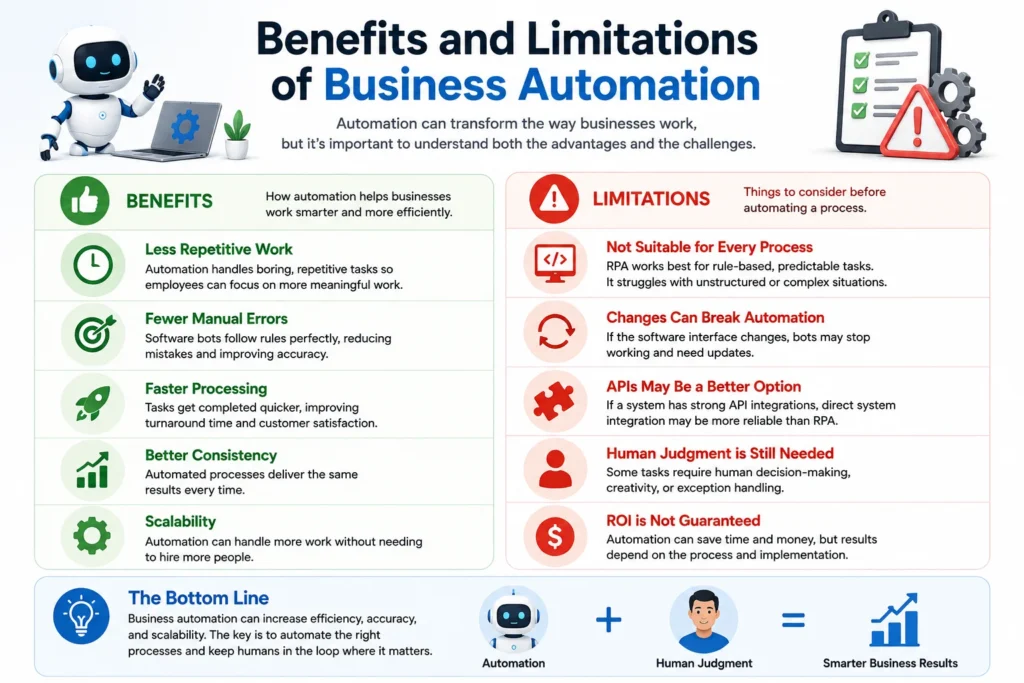
The biggest benefit of automation is that it reduces repetitive work. Businesses may also gain faster processing, fewer manual data-entry errors, better consistency, and improved operational efficiency.
Automation can also support scalability. A workflow that handles 100 routine transactions may be able to handle a much larger volume without requiring employees to repeat every step manually.
However, automation is not suitable for every process.
RPA can become difficult to maintain when software interfaces change frequently. It may also be a poor choice when a process requires constant human judgment or when a reliable API integration already exists. IBM notes that API-based integration is generally preferable where a suitable API is available, especially for large-scale operations.
There is also no guaranteed automation ROI. Businesses should measure time saved, error rates, operating costs, and other results instead of assuming automation will automatically produce savings.
Human-in-the-loop automation can be useful when a process includes exceptions or decisions that require human judgment.
How to Choose the Right Automation Approach
The best automation strategy starts with the business problem, not the technology.
First, identify the repetitive process that takes the most time. Then use process mapping to understand every step, including applications, inputs, decisions, and exceptions.
Next, check whether the systems already provide API integrations or built-in connections. If a reliable API exists, direct system integration may be a better option than RPA.
RPA can be useful when employees must interact with existing or legacy systems through their screens. Workflow automation may be better when several connected applications need to work together.
AI should be considered when the process involves variable or unstructured information, such as documents, messages, or language.
Finally, measure the results. Compare processing time, errors, costs, and productivity before and after automation.
Microsoft documents examples where RPA can interact with legacy systems while other workflows transfer and process the resulting data across modern business applications.
How to Get Value From Droven.io
Someone researching Droven.io automation can use the platform as an educational starting point for learning about RPA, AI automation, workflow automation, and digital transformation. The official site presents categories covering automation and RPA, AI in business processes, and related technology topics.
The most useful approach is to use this information to learn the basic terminology, understand automation use cases, compare different approaches, and identify questions to ask before choosing actual RPA software or an automation platform.
Readers should still verify current pricing, technical capabilities, security information, and performance claims directly with the software vendor before making a business decision.
Final Thoughts on Droven.io RPA and Business Automation
Droven.io RPA and business automation is best understood as a topic connecting RPA, workflow automation, AI, and broader business process automation.
RPA is especially useful for repetitive, structured tasks. Broader business automation can connect complete workflows, while AI can help with more complex or unstructured information.
The smartest approach is not to automate everything. Start with one repetitive process, understand how it works, remove unnecessary steps, choose the right technology, and keep people involved where judgment is important. Done properly, automation can improve productivity, consistency, and business efficiency without making the process unnecessarily complicated.
Q&A
Is AI replacing RPA?
Not completely. AI and RPA have different strengths. RPA is good at following clear, rule-based instructions, while AI can work with patterns, language, and less-structured information. Many businesses can use both together. AI can make automation more flexible, while RPA can carry out repetitive computer tasks based on defined workflows.
Does RPA count as AI?
No. RPA and AI are different technologies, although they can work together. RPA generally follows predefined instructions to complete repetitive tasks. AI can analyze information, recognize patterns, and handle more complex inputs. When businesses combine these technologies, the result may be called intelligent automation.
Can I learn RPA on my own?
Yes. Beginners can learn RPA through online courses, tutorials, documentation, and small practice projects. Start by learning workflows, variables, triggers, and rule-based processes. Then try simple projects such as moving data between spreadsheets and applications. You do not need to be an advanced programmer to begin learning the basic ideas behind RPA.
What is the RPA salary?
RPA salaries vary based on location, experience, job title, and technical skills. Entry-level automation roles generally pay less than experienced RPA developers, architects, or automation managers. Skills in RPA platforms, APIs, databases, Python, cloud systems, and AI can improve career opportunities. For current salary information, check recent U.S. data for the specific job title.
Which jobs are most likely to be affected by AI and automation by 2030?
Jobs with many repetitive and predictable tasks may face greater pressure from automation. The World Economic Forum’s 2025 report expects roles such as data entry clerks, bank tellers, postal service clerks, and some administrative roles to decline globally by 2030. However, job change does not mean every worker in these roles will lose employment.
Which jobs are likely to remain valuable as AI grows?
Jobs that depend heavily on human judgment, creativity, communication, physical work, or interpersonal skills may remain important. The World Economic Forum expects technology, healthcare, education, construction, and other areas to see opportunities through 2030. It also highlights human skills such as creative thinking, flexibility, and collaboration as important in a changing job market.