
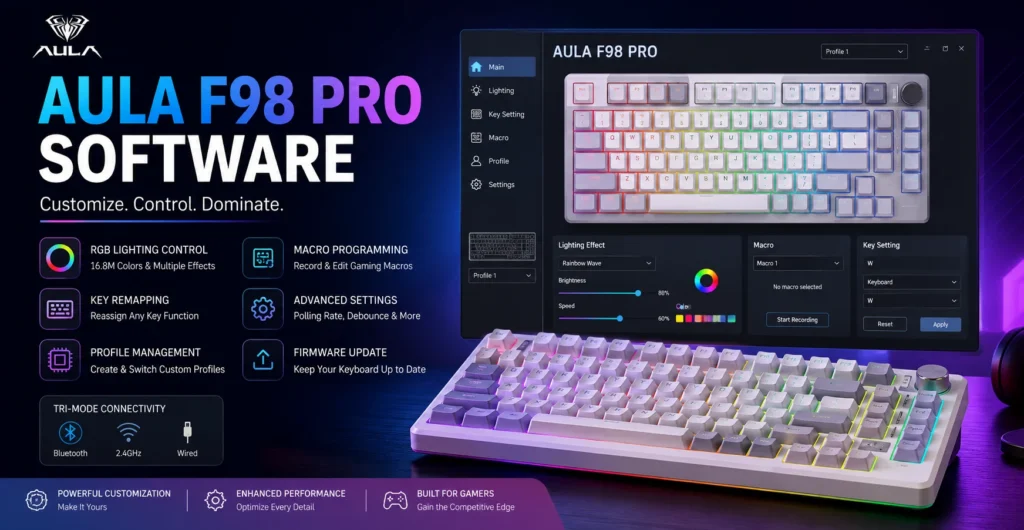
If you own an Aula F98 Pro mechanical keyboard, installing the Aula F98 Pro software can help you unlock its full potential. This keyboard companion software gives you access to advanced keyboard settings, RGB lighting control, macro programming, and key remapping features.
Whether you are a gamer, student, or office worker, the software makes it easier to personalize your keyboard and improve your overall experience. In this guide, you’ll learn what the software does, how to install it, and how to customize your keyboard step by step.
- What Is Aula F98 Pro Software?
- Key Features of Aula F98 Pro Software
- How to Download and Install Aula F98 Pro Software
- How to Customize Your Aula F98 Pro Keyboard
- Compatibility and System Requirements
- Common Problems and Troubleshooting Tips
- Pros and Limitations of Aula F98 Pro Software
- Is Aula F98 Pro Software Worth Using?
- Frequently Asked Questions
What Is Aula F98 Pro Software?
Aula F98 Pro software is a device configuration utility designed for the Aula F98 Pro mechanical keyboard. It acts as a keyboard customization platform that allows users to control features that are not available through the keyboard alone.
With this software, you can change F98 Pro keyboard settings, create custom key bindings, manage user profiles, and customize RGB backlighting controls. It also helps with firmware management and keyboard performance settings.
The software is useful for anyone who wants more control over their keyboard. Gamers can create gaming macros, while everyday users can build productivity shortcuts for common tasks.
Key Features of Aula F98 Pro Software
One of the biggest reasons users install the Aula keyboard software is its wide range of customization options.
RGB lighting customization is one of the most popular features. You can choose from different lighting presets, RGB animation modes, and custom lighting effects to match your setup.
The software also supports macro programming. Using the built-in macro recording feature, users can record a series of commands and assign them to a single key. This can save time during gaming or repetitive work.
Another useful feature is key remapping. The key assignment settings allow you to change the function of specific keys and create personalized shortcuts.
Profile management is also available. You can create multiple keyboard profiles and switch between them depending on your activity. Thanks to onboard memory support, some settings can remain saved even when moving between devices.
Finally, the software supports keyboard firmware updates, helping improve software compatibility and overall performance.
How to Download and Install Aula F98 Pro Software
To get started, download the official software package from the AULA support page.
After downloading the file, follow these steps:
- Open the installation file.
- Accept the installation prompts.
- Wait for the driver installation process to finish.
- Restart your computer if required.
- Connect your keyboard and launch the software.
Most users running modern versions of Windows will have no trouble completing the Aula software setup.
Once installed, the software interface will automatically detect your keyboard and display available customization options.
How to Customize Your Aula F98 Pro Keyboard
Creating Custom Macros
Macros allow you to perform several actions with one key press. Open the software, select the macro section, and create a new command sequence.
Many gamers use gaming macros and commands for faster actions in games. Office users often create shortcuts for repetitive tasks such as copying, pasting, or opening applications.
Adjusting RGB Lighting Effects
The RGB effects customization section lets you control brightness, speed, colors, and animations.
You can choose from several RGB lighting control options, including breathing effects, wave patterns, and static colors. Some users also use RGB synchronization settings to create a consistent look across their gaming setup.
Remapping Keys and Shortcuts
Key remapping is useful when you want certain keys to perform different actions.
The software allows you to create custom key bindings and modify programmable keys. This feature is especially useful for gaming, content creation, and productivity workflows.
Compatibility and System Requirements
The Aula F98 Pro supports tri-mode connectivity, including wired, Bluetooth, and 2.4GHz wireless keyboard connections.
The software is primarily designed for Windows compatibility and generally works best when connected through a wired connection during initial setup.
The keyboard can also function in wireless mode, making it a flexible wireless keyboard software solution for users who switch between devices.
Basic requirements include:
- A compatible Windows system
- Available USB port for setup
- Stable keyboard connection
- Administrator permissions for installation
Some software features may vary depending on firmware version and operating system updates.
Common Problems and Troubleshooting Tips
Sometimes users experience software troubleshooting issues during installation or setup.
If the software is not detecting the keyboard, reconnect the device and try using a wired connection. Updating the Aula keyboard driver update may also help.
Installation errors are often caused by incomplete downloads or missing permissions. Running the installer as an administrator can solve many of these issues.
If keyboard profiles are not saving correctly, check whether the latest keyboard firmware update is installed.
For firmware update problems, avoid disconnecting the keyboard during the process. Interruptions can cause firmware management issues and prevent successful updates.
Pros and Limitations of Aula F98 Pro Software
The software offers several advantages.
Pros:
- Easy keyboard personalization
- Powerful macro programming tools
- Flexible RGB lighting control
- Multiple user profiles
- Support for firmware updates
However, there are some limitations.
The software is mainly optimized for Windows systems, and some advanced features may feel basic compared to premium gaming keyboard software from larger brands.
Still, for most users, the keyboard configuration tool provides enough customization for daily use, gaming setup optimization, and performance tuning.
Is Aula F98 Pro Software Worth Using?
Yes. If you own an Aula F98 Pro mechanical keyboard, the software is worth installing.
It gives you access to keyboard personalization options that are difficult or impossible to manage directly from the keyboard. Features such as custom profile switching, RGB customization, key remapping, and macro creation make the keyboard much more versatile.
Gamers will appreciate the gaming-focused features, while everyday users can benefit from improved productivity and convenience. Overall, the Aula F98 Pro software is an excellent tool for getting the most value from your keyboard.
Frequently Asked Questions
Does AULA have software for its keyboards?
Yes. Many AULA keyboards come with dedicated software that allows users to customize lighting, create macros, remap keys, and install firmware updates. The available features depend on the specific keyboard model.
How do I download Aula F98 Pro software?
You should download the software from the official AULA website. Using the official source helps ensure you receive the latest version and reduces the risk of downloading unsafe files.
Can I customize my Aula F98 Pro keyboard?
Yes. The software allows you to customize RGB lighting, create user profiles, assign shortcuts, and modify key functions based on your preferences.
Can I reprogram keys on the Aula F98 Pro?
Yes. The key remapping feature allows you to assign different functions to specific keys and create custom shortcuts for gaming or productivity.
What should I do if the software does not detect my keyboard?
Check that the keyboard is properly connected, restart the software, and try using a wired connection. Updating drivers and firmware can also help resolve detection issues.
Does Aula F98 Pro software support macros?
Yes. The software includes a macro recording feature that lets users create custom commands and assign them to specific keys for faster and more efficient workflows.