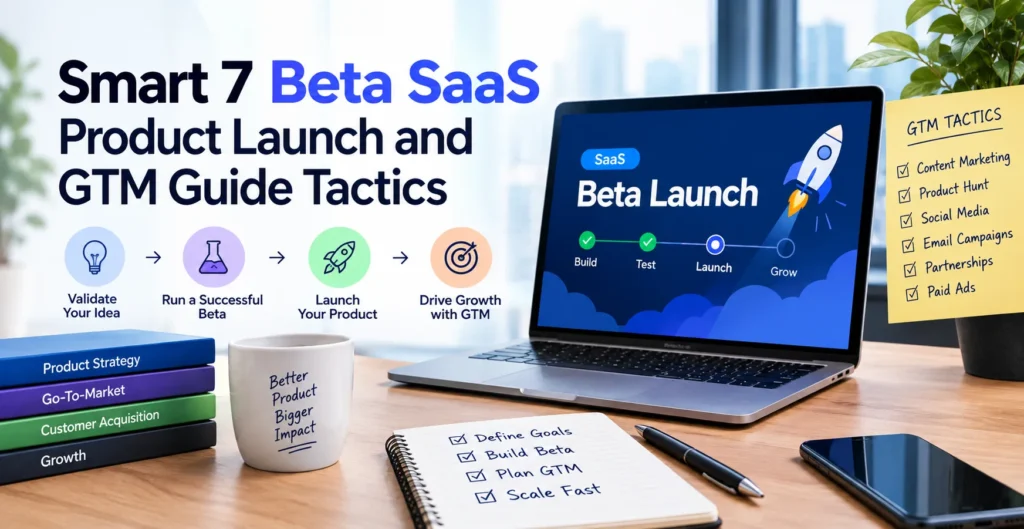
A successful Beta SaaS Product Launch and GTM Guide starts before the public launch. The goal is not simply to get users into a beta, but to use those users to validate the product, improve the experience, test pricing, find the right market, and build a repeatable go-to-market strategy.
The best path is simple: beta testing → validation → paying customers → product-market fit → public launch → growth.
- What Is a Beta SaaS Product Launch?
- Define Your ICP, Positioning, and Value Proposition Before Beta
- How to Recruit Your First 10, 25, or 50 Beta Users
- Build a Beta Testing Program That Produces Useful Feedback
- Test SaaS Pricing and Convert Beta Users Into Paying Customers
- Measure Beta Success With the Right Product Launch Metrics
- Create a SaaS Go-to-Market Strategy for Public Launch
- Beta-to-Public Launch Timeline and Launch-Day Checklist
- What to Do After Beta: PMF, Growth, and the Next 90 Days
- Beta SaaS Launch Assets and Practical Templates
- Frequently Asked Questions
What Is a Beta SaaS Product Launch?
A SaaS beta launch is a controlled release of a product to a limited group of real users before the full public launch. It gives the team a chance to find problems, understand user behavior, test onboarding, collect feedback, and confirm that the product solves a real problem.
A beta usually comes after the minimum viable product (MVP) stage. An MVP proves that the basic product can work, while a beta tests how real customers use it in practice.
| Stage | Main Purpose | Typical Users |
|---|---|---|
| Alpha | Find major technical problems | Internal team |
| Private beta | Validate the product with selected users | Small invited group |
| Public beta | Gather broader market feedback | Larger user group |
| MVP | Prove the core product concept | Early users |
| Full launch | Make the product broadly available | Target market |
A beta is useful when the core product works but the team still needs real-world evidence. It is not the right time to launch if the main workflow is unreliable, security problems remain, users cannot complete basic tasks, or the team has no clear learning goal.
Beta Launch Readiness Checklist
Before inviting beta users, check the core workflow from signup to the main product outcome. Authentication, onboarding, analytics, support, security, billing, and error tracking should also be ready.
Set one or more clear learning goals. For example, you may want to learn whether users can reach the first value within 10 minutes or whether they understand the product without direct help.
Define Your ICP, Positioning, and Value Proposition Before Beta
Your ideal customer profile (ICP) should be clear before you recruit beta users. Define who has the problem, how serious the problem is, what solution they use now, and why they would change.
Your product positioning should explain why your SaaS is different from competitors and alternatives. Avoid vague claims such as “the easiest platform” unless you can prove them.
A strong value proposition connects a specific customer problem with a clear outcome. For example, instead of saying, “Our tool uses AI for reporting,” say, “Our tool turns weekly marketing data into a client-ready report in minutes.”
Create Your Beta GTM Thesis
Build your first GTM hypothesis around four elements:
ICP + problem + message + channel
For example: “We believe small marketing agencies struggle to create client reports quickly, will respond to automated reporting, and can be reached through founder-led LinkedIn outreach.”
Decide what evidence would prove or disprove the idea. If users repeatedly ignore the message, fail to activate, or do not see enough value to pay, change the hypothesis instead of simply increasing marketing spend.
How to Recruit Your First 10, 25, or 50 Beta Users
Early beta recruitment should focus on relevance, not volume. Ten users who strongly match your ICP can produce more useful information than 500 random signups.
Start with founder networks, existing contacts, LinkedIn, professional communities, customer interviews, waitlists, and targeted outreach. Ask people with the actual problem to test the product rather than asking anyone who is willing.
For a very early SaaS, the first 10 users should be highly engaged. Once the core problems become clearer, expand toward 25 or 50 users to see whether the same patterns continue across a wider group.
Beta Tester Qualification and Invitation
Qualify testers using three simple questions:
- Do they match your ICP?
- Do they regularly experience the problem?
- Will they give feedback and use the product during the beta?
A practical invitation can be short:
“We’re testing a new tool that helps [customer type] solve [specific problem]. I’m inviting a small group of people who deal with this regularly. Would you be interested in trying it and sharing honest feedback?”
Do not promise that the product is finished. Be clear that beta users are helping shape the product.
Build a Beta Testing Program That Produces Useful Feedback
A beta testing program should give users specific tasks. Asking “What do you think?” often produces vague answers that are difficult to act on.
Instead, ask users to complete the main workflow. Watch where they hesitate, what they misunderstand, how long they take, and where they need help.
Track user activation, time-to-value, core workflow completion, errors, and feature usage. Combine this data with interviews because numbers can show where a problem exists, while conversations often explain why.
Create a Customer Feedback Loop
Use a simple feedback cycle:
Observe → interview → categorize → prioritize → fix → retest
Start by grouping feedback into critical bugs, activation blockers, usability problems, feature requests, and minor improvements.
Do not build every requested feature. If one person asks for a feature, it may represent a personal preference. If many users struggle with the same workflow, you have stronger evidence that the product needs improvement.
Test SaaS Pricing and Convert Beta Users Into Paying Customers
Pricing should not be postponed until after the public launch. Beta users can help you test whether the value is strong enough to support a real business.
You can use a free, discounted, paid, or invite-only beta. A free beta can increase participation, while a paid beta provides stronger evidence that customers see enough value to spend money.
The right choice depends on the product. If you are still changing the core workflow, a limited free beta may make sense. If the product already delivers a clear business result, testing payment earlier can be more useful.
Get Your First 10 Paying Customers
Start with the users who get the strongest results from the beta. Talk to them directly, show them what improved, and connect the product’s price to the problem it solves.
Use founder-led sales, demos, direct outreach, and personalized follow-ups. Successful beta users can also become your first testimonials and case studies.
A useful practical test is to ask, “If this product disappeared tomorrow, what would you use instead?” The answer can reveal the product’s real competitive position and perceived value.
Measure Beta Success With the Right Product Launch Metrics
Do not judge a beta only by signup numbers. A large signup count means little if users never activate or return.
Important metrics include:
| Metric | What It Tells You |
|---|---|
| Activation rate | Whether users reach the key first value |
| Time-to-value | How quickly users understand the benefit |
| Engagement | Whether users actually use the product |
| Retention | Whether the product remains useful |
| Conversion | Whether users become paying customers |
| Churn | Whether customers leave |
| Feature adoption | Which features create real value |
Beta-stage teams should focus heavily on activation, usability, retention signals, and qualitative feedback. After public launch, acquisition efficiency, conversion, revenue, CAC, and broader growth metrics become more important.
Define Your Beta Exit Criteria
Before starting the beta, define what “ready” means.
Your exit criteria may include reliable core workflows, acceptable activation, improving retention, a manageable critical bug count, positive qualitative feedback, and evidence that users will pay.
If these signals are weak, you have three choices: extend the beta, change the product, or reconsider the target market.
Create a SaaS Go-to-Market Strategy for Public Launch
A SaaS go-to-market strategy is more than announcing your product. It explains who you will target, what message you will use, how you will reach those people, and how you will turn attention into customers.
Choose launch channels based on where your ICP already spends time. Options include founder-led sales, outbound email, SEO and content, communities, partnerships, Product Hunt, paid acquisition, and product-led growth (PLG).
Do not assume that posting on LinkedIn or Product Hunt will create sustainable demand. A launch announcement can create awareness, but a GTM strategy needs repeatable distribution.
Build a GTM Channel Experiment Matrix
Test channels as experiments instead of committing your entire budget to one idea.
| Channel | Hypothesis | KPI | Decision |
|---|---|---|---|
| LinkedIn outreach | ICP responds to personalized messages | Qualified replies | Improve or stop |
| SEO/content | Searchers have the problem | Qualified traffic | Expand or revise |
| Communities | Users seek this solution | Signups/activation | Continue or stop |
| Partnerships | Existing audiences need the product | Referrals | Develop or stop |
| Paid ads | Message converts cold traffic | CAC/conversion | Scale or pause |
Use the cycle hypothesis → launch → measure → diagnose → adjust → repeat. This turns GTM into a learning system instead of a collection of random marketing activities.
Beta-to-Public Launch Timeline and Launch-Day Checklist
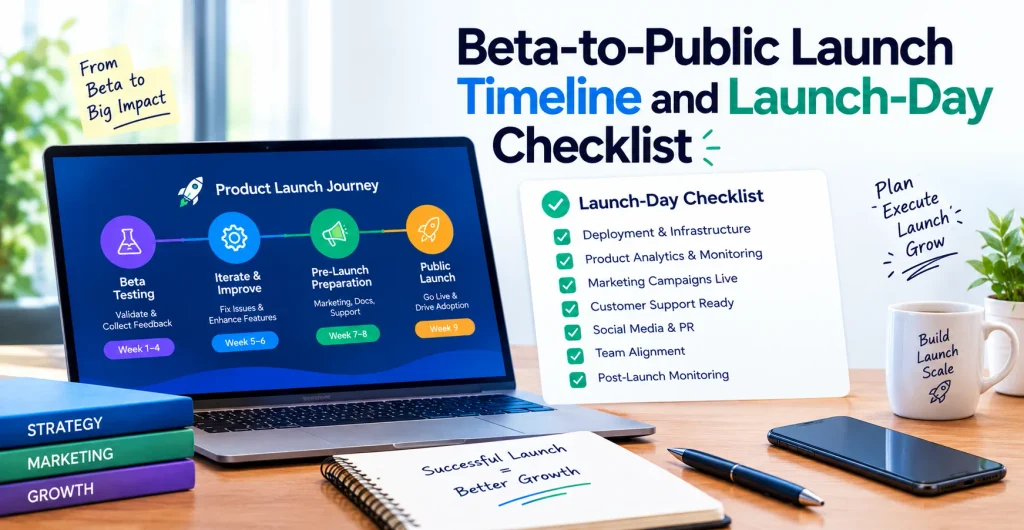
A structured timeline reduces last-minute problems.
T-30: Finalize positioning, recruit beta users, install analytics, test pricing, and prepare launch assets.
T-14 / T-7: Review feedback, fix important bugs, improve onboarding, prepare support, and plan the staged rollout.
Launch Week / T+30: Monitor product performance, collect feedback, improve conversion, evaluate channels, and follow up with new users.
The public launch should not be treated as the finish line. It is the point where your validated learning process becomes a larger market test.
Technical and Operational Launch Readiness
Before opening access, test uptime monitoring, error tracking, analytics events, billing, authentication, email delivery, backups, security, and support processes.
A staged rollout can reduce risk. Instead of allowing everyone in immediately, release to a smaller group, monitor performance, fix issues, and then increase access.
What to Do After Beta: PMF, Growth, and the Next 90 Days
The goal after beta is not immediate scaling. First, determine whether users consistently get enough value to stay and pay.
Use the framework Beta → PMF → Public Launch → Growth. If users love one part of the product but ignore another, improve the valuable workflow before spending heavily on acquisition.
Your beta conversations can also improve positioning, messaging, onboarding, content, FAQs, testimonials, sales scripts, and case studies.
Post-Beta Decision Tree
After reviewing the evidence, choose the next step:
Iterate: Core problems remain.
Extend beta: The product is promising but needs more evidence.
Start paid access: Users consistently receive value and show willingness to pay.
Launch publicly: The product is stable, validated, and commercially ready.
Scale: The product has repeatable acquisition and retention signals.
If none of these conditions are strong enough, stopping or changing direction can be better than scaling a weak product.
Beta SaaS Launch Assets and Practical Templates
Create a reusable launch package before the public release. It should include a beta launch checklist, tester outreach template, feedback questions, KPI tracker, launch timeline, and GTM hypothesis template.
A simple beta learning example might look like this: users sign up for an automated reporting SaaS but fail to connect their data source. Interviews reveal that the setup instructions are unclear. The team simplifies onboarding, watches the next group of users, and sees activation improve.
That change is more valuable than simply collecting another list of requested features because it connects user behavior to a measurable product improvement.
Frequently Asked Questions
Is ChatGPT a SaaS or PaaS?
ChatGPT is primarily offered as a software-as-a-service product because users access the application over the internet without managing the underlying infrastructure. OpenAI also provides developer platforms and APIs, which serve different use cases from the ChatGPT application.
What is replacing SaaS?
SaaS is not being replaced by one single model. AI-native software, AI agents, usage-based pricing, and more automated products are changing how SaaS applications are built and sold.
What jobs will always need humans?
Jobs involving complex human relationships, physical work in unpredictable environments, leadership, judgment, empathy, and accountability are likely to continue needing people. AI can assist with many tasks in these jobs without necessarily replacing the entire role.
What 5 jobs will AI not replace?
No job can be guaranteed to remain completely unaffected by AI. However, roles involving hands-on skilled trades, complex caregiving, high-stakes leadership, relationship-based work, and unpredictable physical environments are generally harder to automate fully.
Is beta version good or bad?
A beta version is neither good nor bad by itself. It is useful when a product is functional enough for real users and the team has clear goals for learning, testing, and improvement.
How long should a SaaS beta last?
There is no universal beta length. A beta should last long enough to collect meaningful usage, feedback, retention, and pricing evidence, then end when the predefined exit criteria are met rather than simply when a fixed number of weeks has passed.